Manage Installed Apps | Harden System Security
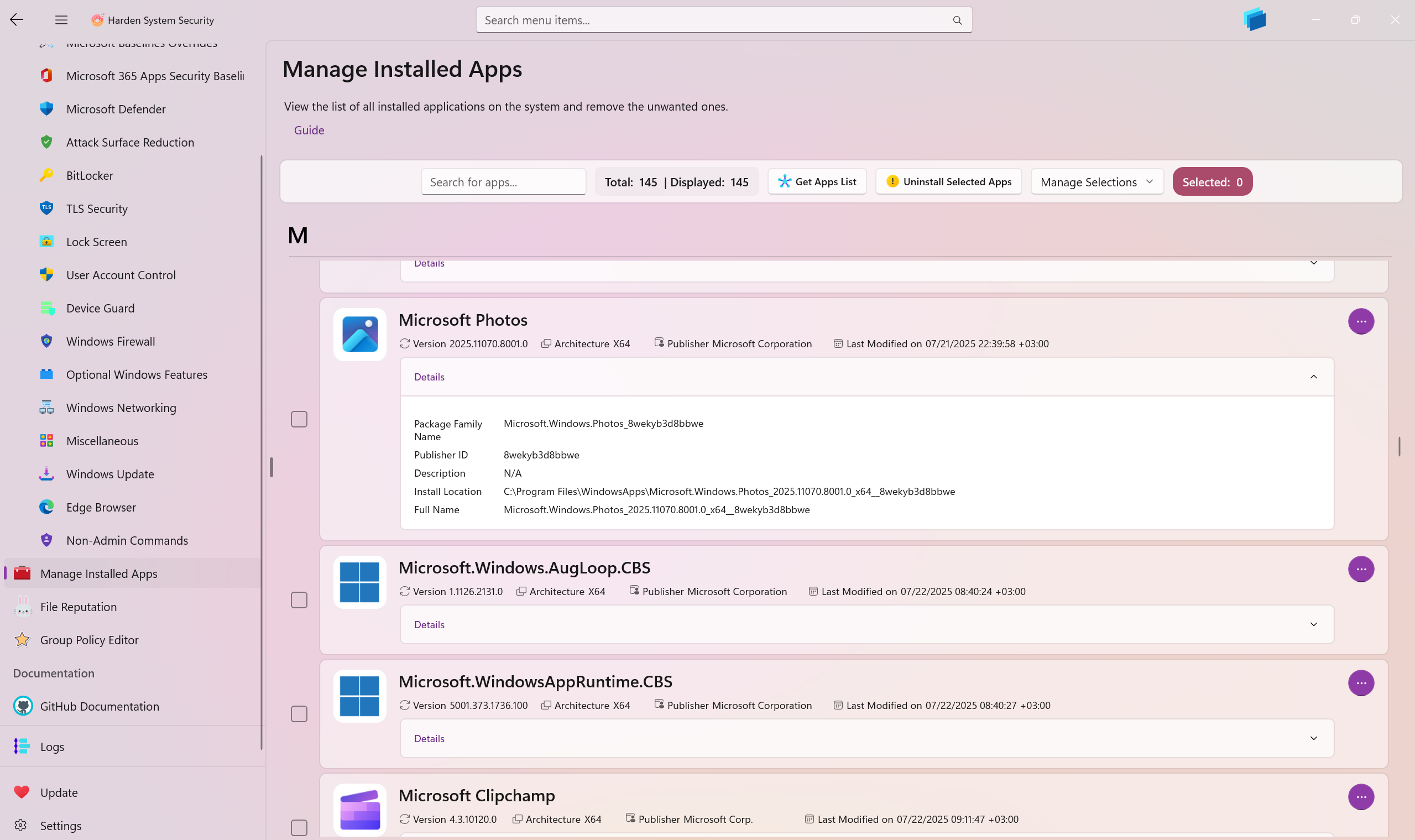
This page is the packaged-app inventory and maintenance surface in Harden System Security. It enumerates installed MSIX / AppX / UWP packaged applications, groups them alphabetically, lets you inspect package metadata in depth, exports the inventory to JSON, and exposes maintenance operations such as uninstall, repair, reset, terminate, and AppContainer loopback exemption management.
What this page is for
Use this page when you need to:
- Audit what packaged apps are installed and what their package identities are
- Inspect package metadata that is normally scattered across Settings and manifest files
- Remove packaged apps in bulk or one at a time
- Run package maintenance operations such as repair, reset or termination
- Review AppContainer network isolation state and manage loopback exemptions
- Export the installed packaged-app inventory as structured JSON
Main actions
Uninstall selected apps
You can uninstall multiple selected packaged apps in one operation.
The app attempts removal for all users first. If Windows returns an access error, it falls back to uninstalling for the current user only. This makes the behavior practical across both per-user and system-wide package installations without forcing you to determine the removal scope manually in advance.
If the current Harden System Security package is among the selected items, the page shows a warning before continuing.
Per-app quick actions
Each app entry exposes a quick-actions menu with the following operations:
- Uninstall - removes that package using the same all-users-first, current-user fallback behavior
- Repair - repairs the selected package
- Reset - resets the package and its app state
- Terminate - stops running resource groups for the selected packaged app
- Add Loopback Exemption - adds the app's AppContainer SID to the Windows loopback exemption list when supported
- Open Location - opens the package installation directory in File Explorer
- Copy App Details - copies the app's collected metadata to the clipboard
Export to JSON
The page can export the loaded app inventory to a .json file.
Manage Loopback Exemptions
This opens a dedicated dialog for reviewing the current AppContainer loopback exemption list, adding all eligible installed apps in one pass, clearing the list entirely, and removing individual entries including orphaned ones.
Grouping and filtering behavior
Installed apps are grouped by their starting character. The search index is built from multiple fields, including:
- display name
- version
- package family name
- publisher and publisher ID
- architecture
- full package name
- description
- install location
- installed date
- app size, app data size and total usage
- capabilities and dependencies
- loopback exemption status
- AppContainer SID
That makes the page useful as a package discovery tool.
App summary fields
Each app card shows a compact operational summary:
- Display Name - the friendly package name shown by Windows
- Publisher - the package publisher display name
- Version - package version from the package identity
- Architecture - package architecture such as
x64,x86,Arm64orNeutral - Installed Date - package installation timestamp converted to local time
- Loopback Exemption - current AppContainer loopback state for the package
The loopback status is shown as:
- Exempt - the app's AppContainer SID is currently present in the Windows loopback exemption list
- Not Exempt - the app has an AppContainer SID but is not exempted
- Unavailable - no AppContainer SID could be resolved for that package, so loopback exemption management is not applicable
Details section
Expanding an app exposes the full property set used by the page.
Storage and package state
- App Size - size of the package installation directory
- App Data Size - size of the app's data footprint associated with the package family
- Total Usage - combined size of package files and app data
- Is Framework - whether the package is a framework package used by other apps
- Is Resource Package - whether the package primarily carries resources such as language or scale assets
- Is Bundle - whether the package is distributed as a bundle rather than a single package
- Is Development Mode - indicates a development-mode package rather than a normal production deployment
- NonRemovable - whether Windows treats the package as non-removable or uninstall-blocked
- Is Partially Staged - indicates an incomplete or staged deployment state
- Signature Kind - Windows package signature classification, for example store, developer or system-signed
- Status - package health state reported by Windows. A healthy package is typically
Ok, but the page can surface other states when relevant.
If the package status is not fully healthy, the page can surface states such as:
DataOfflineDependencyIssueDeploymentInProgressDisabledIsPartiallyStagedLicenseIssueModifiedNeedsRemediationNotAvailablePackageOfflineServicingTampered
Identity and deployment metadata
- Package Family Name (PFN) - the stable family identifier used across Windows package APIs and policy surfaces
- Publisher ID - the compact publisher identifier derived from the package identity
- Full Name - the fully qualified package identity including version, architecture and publisher ID
- Install Location - effective installed path reported by Windows
- Dependencies - dependent package full names required by the package
- Capabilities - capabilities declared in the package manifest
- Capabilities Count - number of unique capabilities found in the manifest
- Package User Information - package registration state for users known to Windows
- Description - package description reported by Windows
AppContainer loopback exemptions
Packaged apps that run inside an AppContainer are normally isolated from unrestricted loopback access. In practice, that means a packaged app may be prevented from talking to services bound to localhost, 127.0.0.1, or the local host stack unless Windows grants a loopback exemption for that app's AppContainer SID. This is also problematic if you configure a Proxy in the Windows because packaged apps will bypass it and connect directly to the Internet instead of going through the proxy server.
This matters for scenarios such as:
- local web development servers
- local API backends used by packaged front-ends
- desktop companion services that listen only on loopback
- debugging connectivity problems in sandboxed packaged apps
What the Manage Loopback Exemptions dialog does
The dialog shows the current exemption set and distinguishes between:
- exemptions that still map to installed apps
- orphaned exemptions whose SIDs remain configured even though the originating app is no longer present or cannot be resolved cleanly
From there you can:
- add all eligible installed packaged apps to the exemption list
- remove individual exemptions
- clear the entire exemption list