Microsoft Security Baselines | Harden System Security
A security baseline is a group of Microsoft-recommended configuration settings that explains their security implications. These settings are based on feedback from Microsoft security engineering teams, product groups, partners, and customers.
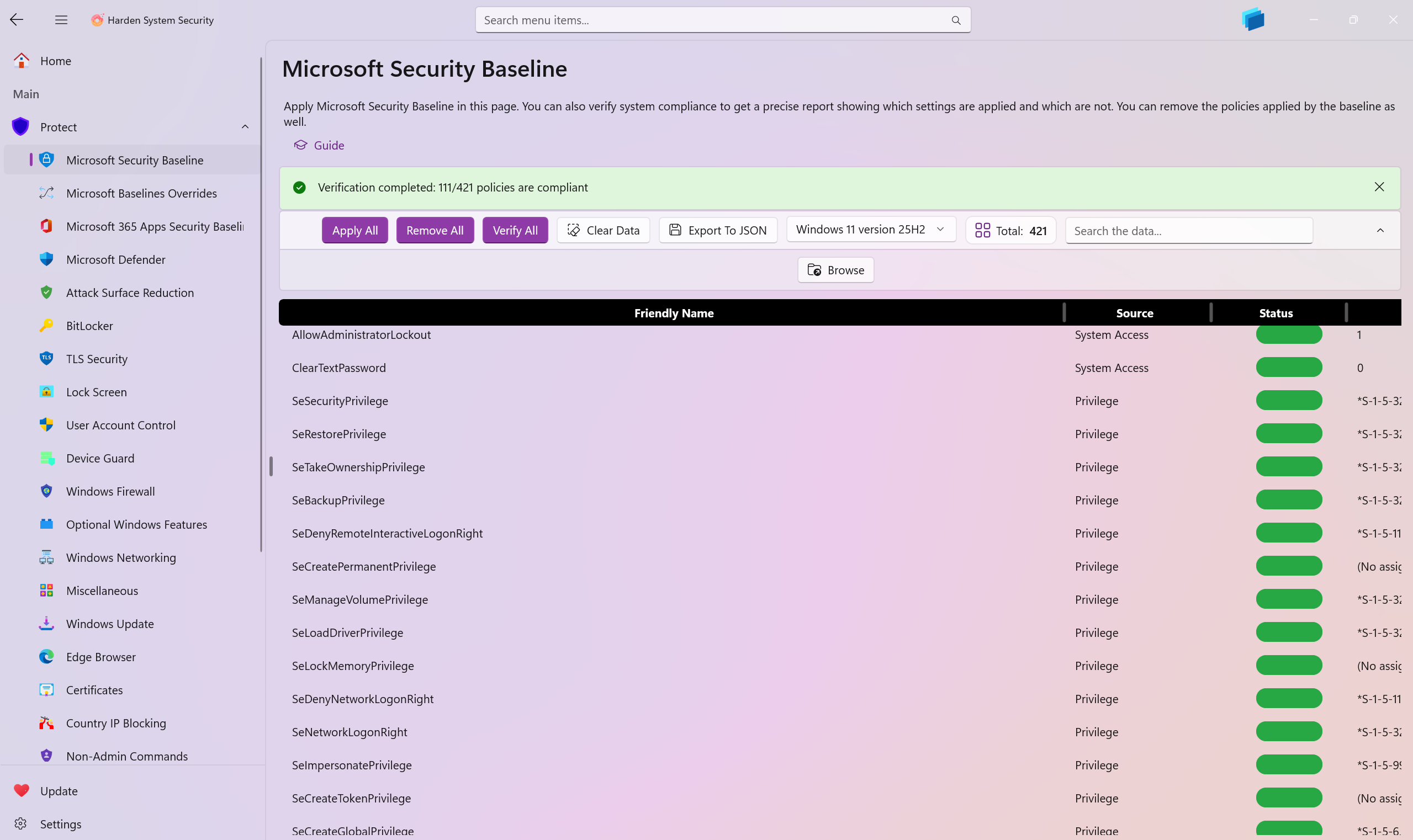
On this page, the Harden System Security app enables you to apply the Microsoft Security Baselines on your system, verify compliance, and remove the applied policies.
You can measure the compliance level of your system using the built-in compliance assessment functionality by simply pressing the Verify button on this page. You will receive a detailed report of every security measure inside the Microsoft Security Baseline and you will be able to export this security report to a properly formatted JSON file as well.
Each security measure has the following details:
Friendly Name: Helps you easily identify the security measure and its purpose.Source: Shows you which part of the Microsoft Security Baseline this security measure belongs to.Status: Whether the current system applies the security measure or not.Current Value: The current value of the security measure on the system.Expected Value: The correct and secure value the security measure should be in order to be compliant.
-
You can use the Baseline selector Dropdown button to select an older or newer baseline to be applied, removed or verified on your system.
-
Use the
Browsebutton to browse for a Microsoft Security baseline ZIP file that you've already downloaded on your device, this way you can use it on systems that have no Internet connectivity. -
Use the Apply Optional Overrides toggle button, which is toggled by default, to apply the Overrides for Microsoft Security Baseline. They are recommended for enhanced user experience when using the Microsoft Security Baselines.
-
Users usually apply the Microsoft Security Baseline on their system, which is mostly geared towards enterprise use, but then they find that some settings are not user-friendly for personal use. These optional overrides help to mitigate that situation. You can of course disable this toggle if you want to stick strictly to the Microsoft Security Baseline without any modifications.
Note
Either when downloading the Security Baseline from Microsoft Servers or when browsing for the zip file manually, the Harden System Security app will process it entirely in memory, and apply it without writing any temporary files to disk. The same is true for verification or removal processes.
While this approach increases development complexity, it significantly improves security by preventing malicious interference with temporary files before application.
The app caches the baseline in memory to avoid unnecessary re-downloads and/or re-reads. The cache expires every 2 hours, after which it is refreshed with the latest data from the Microsoft Server/File path you provided, and this only happens if the app is open. The cache is compressed to minimize memory usage.
Tip
Official Documentation for the Microsoft Security Baseline
Optional Overrides for Microsoft Security Baselines
Highly recommended to apply these overrides. Use Optional Overrides when applying the hardening measures on Azure VMs.