View File Certificates
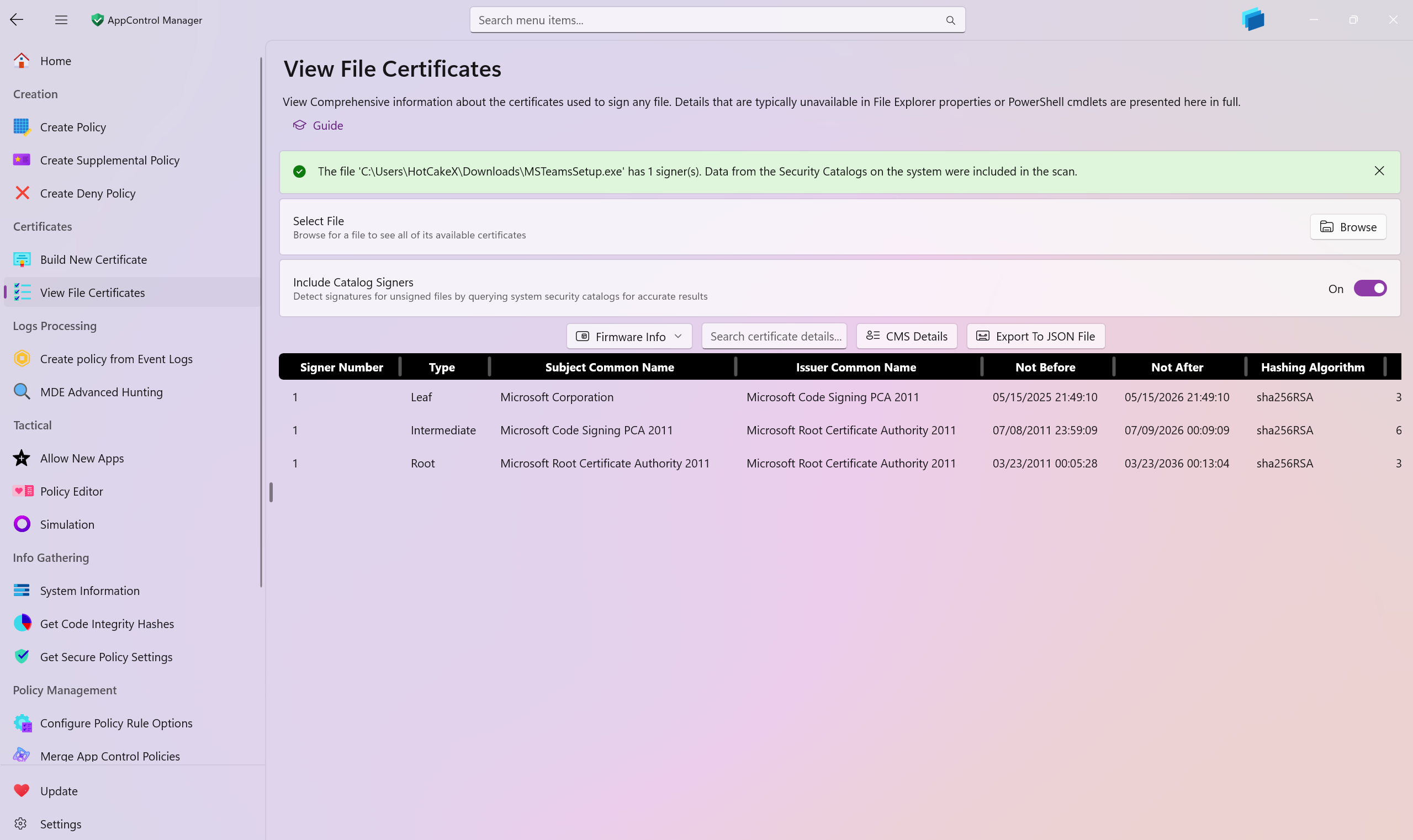
Use this AppControl Manager page to inspect, search, sort, copy, and export highly detailed information about the public key certificates found in signed content on your system. The page can display the complete chains (Leaf, Intermediate, Root) for each signer of a signed file, as well as parse standalone certificates and signed App Control policy packages.
Tip
You can verify the signing certificates inside .CIP files (signed App Control policies) and standalone .cer certificate files.
Note
This feature supports files signed via Security Catalogs (.cat). When enabled, it can resolve certificates via the Windows catalog store if a file has no embedded signer.
What You Can Analyze
- Any file with an embedded Authenticode signature
- Files signed via Security Catalogs (when "Include Security Catalogs" is enabled)
- Signed App Control policy packages (
.CIP) - Standalone X.509 certificate files (
.cer)
Getting Started
- Browse: Click "Browse for file" and pick a file to analyze.
- Drag and Drop: You can drag a file onto the page when the app is not elevated.
- Include Security Catalogs: Toggle on to resolve signers from Windows catalogs when a file has no embedded signature.
- CMS Details: For
.CIPfiles, click "CMS details" to view CMS metadata (version, content type, sizes, etc.). - Export: Click "Export to JSON" to save the data as a JSON file.
Security Catalog Support
When "Include Security Catalogs" is enabled and a target file has no embedded signature: - The app computes the file's Code Integrity hashes (SHA-1 and SHA-256) and searches the Windows catalog store for a matching entry. - If found, the catalog file is used to resolve and display the signer's full certificate chain. - If a catalog hash mismatch is encountered, it is logged; the UI continues processing other sources.
This is useful for system files and drivers which are often signed via catalogs.
CMS Details for .CIP Files
When analyzing a .CIP file, the page decodes the CMS (PKCS#7) package and shows:
- CMS Version: The CMS structure version.
- Is Detached: Indicates whether the signature is detached.
- Content Type (Friendly Name): Friendly name of the CMS content type OID.
- Content Type (OID): The raw OID value of the CMS content type.
- Raw CMS Data Length: Total size in bytes of the CMS blob.
- ContentInfo Data Length: Size in bytes of the inner
ContentInfo.Content.
These values are only meaningful for .CIP. For other file types, these values are blank/zero.
Columns and Data Reference
Each row represents one certificate in a signer's chain. Columns:
| Name | Description |
|---|---|
| Signer Number | A unique identifier assigned to the certificate's signer. If the file is signed by multiple certificates, then each of them will have a different number, allowing you to easily differentiate between them. |
| Type | Certificate role in the chain: Leaf, Intermediate, or Root. |
| Subject Common Name | The Subject CN of the certificate. |
| Issuer Common Name | The Issuer CN of the certificate. For Root, this is the same as Subject. |
| Not Before | The date/time when the certificate becomes valid. |
| Not After | The date/time when the certificate expires. |
| Hashing Algorithm | The signature algorithm used by the certificate (e.g., SHA256RSA, ECDSA). |
| Serial Number | Unique serial number assigned by the issuing CA. |
| Thumbprint | Digest of the entire certificate (fingerprint), used for quick identification. |
| TBS Hash | Hash of the "To Be Signed" portion of the certificate. Useful for integrity checks. |
| Extension OIDs | List of extension OIDs present on the certificate, with friendly names when available. |
| Version | X.509 version of the certificate. |
| Has Private Key | Indicates whether a private key is associated with this certificate in the current context. |
| Archived | Whether the certificate is marked as archived. |
| Certificate Policies | Decoded certificate policies extension, when present. |
| Authority Information Access | Decoded AIA extension, when present (e.g., CA issuers/OCSP). |
| CRL Distribution Points | Decoded CRL distribution points, when present. |
| Basic Constraints | Indicates CA capability and path length constraints (if any). |
| Key Usage | Decoded Key Usage or Enhanced Key Usage information, when present. |
| Authority Key Identifier | Raw AKI, shown as a hex string when present. |
| Subject Key Identifier | SKI value, when present. |
| Raw Data Length | Length (in bytes) of the DER-encoded certificate. |
| Public Key Length | Public key size in bits (e.g., RSA/ECDSA key size), when determinable. |
Copy to Clipboard
Right-click a row to open the context menu: - Copy row: Copies the selected row(s) as labeled text (all columns) to the clipboard. - Copy individual items: Copy a single column value from the selected row.
Keyboard shortcut: - Ctrl+C copies the currently selected row(s) in labeled format.
Tips
- If you see no rows for a signed file, try enabling "Include Security Catalogs" (common for drivers/system files).
- Root certificates show the same value for Subject and Issuer (self-signed).
- Some extensions may be unavailable or displayed as raw hex if decoding is not applicable.
- Catalog hash mismatches are logged and skipped gracefully.
Firmware Info
Used for analyzing the firmware's UEFI variables and Secure Boot data directly from the application.
Key capabilities include:
-
Get Platform Key: Retrieve the Platform Key (PK), the root of trust that controls access to the Key Exchange Key database and establishes ownership of the platform.
-
Get Default Platform Key: Retrieve the factory default Platform Key (PKDefault), representing the original root of trust provided by the system manufacturer.
-
Get Key Exchange Key: Retrieve the Key Exchange Key (KEK) database, containing keys trusted to update the signature database (db) and the forbidden signature database (dbx).
-
Get Default Key Exchange Key: Retrieve the factory default Key Exchange Key (KEKDefault) database, containing the initial set of keys trusted for database updates provided by the system manufacturer.
-
Get Signature Database: Retrieve the Signature Database (db), containing the list of trusted certificates and hashes allowed to execute on this system.
-
Get Default Signature Database: Retrieve the factory default Signature Database (dbDefault), containing the initial set of trusted certificates and hashes provided by the system manufacturer.
-
Get Forbidden Signature Database: Retrieve the Forbidden Signature Database (dbx), containing the revocation list of compromised certificates and hashes that are blocked from booting.
-
Get Default Forbidden Signature Database: Retrieve the factory default Forbidden Signature Database (dbxDefault), containing the initial revocation list provided by the system manufacturer.
Potential for Detecting Virtual Machines
Virtual machines running on hypervisors such as Hyper-V, VMware, or VirtualBox show different values than a real bare metal system.
-
Hyper-V: At the time of this writing, Hyper-V VMs do not display all of the
Defaultvariations of UEFI variables; in fact, you will encounter an error when attempting to get the values ofPKDefaultordbxDefault. Whether the VM is shielded or not does not have any effect on the results. -
VirtualBox: At the time of this writing, attempting to get many of the UEFI variables mentioned in this post results in an error on VirtualBox VMs.
-
VMware: At the time of this writing, attempting to get the Platform Key or Default Platform Key in VMware Workstation VMs results in 0 certificates, an anomaly that can be considered an indicator of a VM. Additionally, getting the default DBX database results in significantly fewer forbidden hashes than those available on the host. The Default and non-default DB both have certificates with the subject
VMware, Inc., which can clearly help identify that the system is a VM.
Tip
You can read more about these UEFI Secure Boot variables on:
-
https://learn.microsoft.com/en-us/windows-hardware/manufacture/desktop/windows-secure-boot-key-creation-and-management-guidance
-
https://uefi.org/sites/default/files/resources/Evolving%20the%20Secure%20Boot%20Ecosystem_Flick%20and%20Sutherland.pdf
-
https://uefi.org/specs/UEFI/2.9_A/32_Secure_Boot_and_Driver_Signing.html
-
https://github.com/microsoft/secureboot_objects
-
https://learn.microsoft.com/en-us/windows-hardware/manufacture/desktop/validating-windows-uefi-firmware-update-platform-functionality